Hiring database template
Build an applicant tracker with stages and interview views
Track candidates, interviews, and next steps by role.
Make this with my informationOpens an editable creation brief. Nothing runs until you submit.
- Format
- Hiring database
- Last updated
- August 31, 2026
- You bring
- 3 inputs
- By
- Huggle Editorial
The creation brief
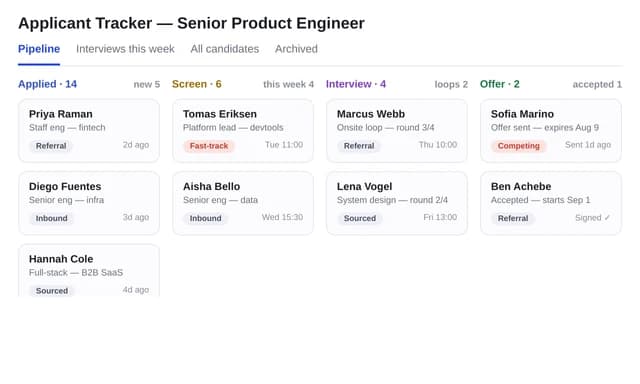
This template is for small teams hiring without an ATS. Huggle builds roles, candidates, and stages as linked tables with a pipeline and a follow-up view.
Creation recipe
Build an applicant-tracking database for a fictional 20-person company. Tables: roles, candidates, stages, interviews, owners. Seed 12 fictional candidates across two roles. Views: pipeline by stage, interviews this week, roles open. Do not invent email addresses that look real.
What Huggle creates
- Relational ATS with roles, candidates, and interviews
- Pipeline and this-week interview views
- Fictional seed data that does not look like real people
What to bring
- 01Roles you are hiring and the stages you use
- 02Who owns each role
- 03Interview types you run
Overview
What is an applicant tracker?
An applicant tracker is a lightweight ATS: a database of roles, candidates, stages, and interviews so a hiring team can see the pipeline and this week's conversations. An AI ATS builder should create those relationships and views, not a spreadsheet of names you overwrite.
What's included
What this AI hiring database builder creates
Roles and candidates
A candidate belongs to a role. The example seeds 12 fictional people across two jobs. Use obviously fake names in demos; the brief says not to invent email addresses that look real.
Stages
Applied, screen, interview, offer, hired, rejected — or your list. Same lesson as CRM adoption: if stages are not the ones you hold, nobody updates the board.
Interviews this week
A view of upcoming interviews is the daily tool. The pipeline view is the weekly tool. Open roles is the headcount tool.
Not a compliance ATS
This is a working tracker for a small team. It is not Greenhouse. Add equal-employment and data-retention practices yourself.
Comparison
Huggle vs. a hiring spreadsheet
Spreadsheets lose interview history. This generator builds a small relational ATS.
| Criterion | Huggle | Static template |
|---|---|---|
| Data model | Candidates linked to roles, stages, and interviews | One row per person that you overwrite |
| Views | Pipeline, interviews this week, open roles | A filter you rebuild each Monday |
| Privacy | Demo emails stay obviously fake | Sample Gmail addresses that look real |
| Revision | Ask Huggle to add a scorecard table | Another tab named ‘v2’ |
Sources
Sources and benchmarks
- SHRM’s 2025 benchmarking research put the average cost per hire at $5,475 for nonexecutive roles — and executive hires at nearly seven times that — so a lost candidate is an expensive miss. SHRM, 2025 Benchmarking Reports
How it works
From example to your finished artifact
- 01
Start from the proven recipe
Open Huggle with the complete creation brief already in the composer.
- 02
Add your context
Answer a few focused questions so the structure, content, and visual direction fit your situation.
- 03
Create and refine
Generate an editable artifact, then ask Huggle to revise it until it is ready to use.
Use the recipe
Make a version that belongs to your work.
Huggle will ask for the missing context, then create an editable database you can keep refining.
Frequently asked questions
- What is an AI applicant tracker?
- It builds a hiring database with roles, candidates, stages, and interview views from your process. It is a lightweight ATS, not a full HRIS.
- How is this different from Greenhouse or Lever?
- Those products include careers pages, compliance, and integrations. This template gives a small team a pipeline they can run this week.
- Can I track more than one role?
- Yes. Roles are a table. The example uses two open roles.
- Is candidate data private?
- Treat it as personal data. Do not seed real applicants into a shared demo. Follow your local hiring-record rules.
- Is the database editable after it is generated?
- Yes. Add a score, a source field, or ask Huggle for a rejected-with-reason view.
- What information do I need to bring?
- Bring roles, stages, owners, and the interview types you run.
- Will Huggle invent candidates?
- Only fictional seed rows so you can click the views. Replace them. Do not use emails that look like real people.
- How do I use this applicant tracker template?
- Open Huggle with the creation brief in the composer, set your roles and stages, and submit. Load real candidates only in a workspace you control.
Related templates
2 artifacts
Agency CRM
Track contacts, deals, and follow-ups in a connected database.

Academic CV
Format your publications, teaching, and experience as an academic CV.
Also explore agency CRM database template with pipeline views and LaTeX academic CV template.