AI spreadsheet generatorWorking workbooks with real formulas from a prompt

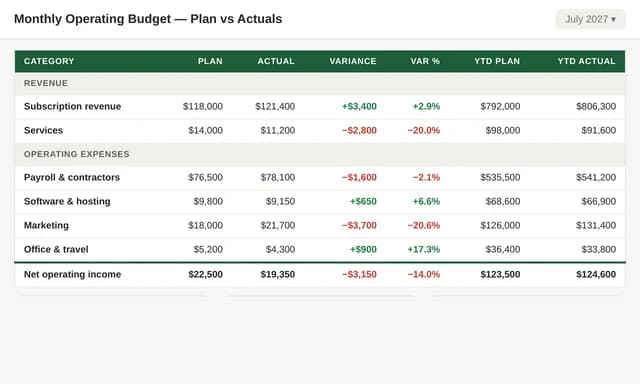
Huggle's AI spreadsheet generator builds working workbooks from a short brief: an assumptions sheet you can edit, calculations linked by real formulas, scenario cases, and a summary or dashboard that updates when inputs change. The spreadsheet opens as an editable file in your workspace, so you can change a number, add a column, or ask Huggle to extend the model. Every frontier model is included under one subscription, and a free account with no card lets you generate your first workbook.

Free to start, no card required. Paid plans from $10 a month with every frontier model included. See pricing.

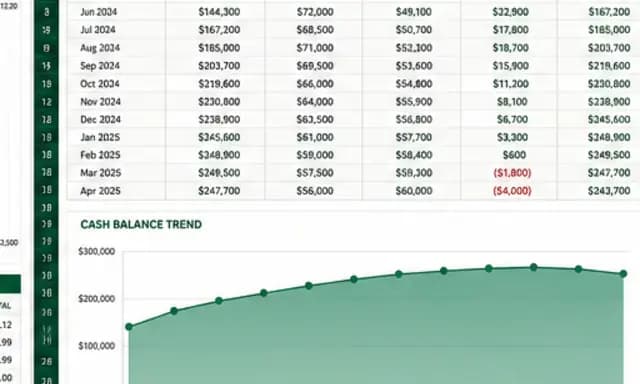
One request. A finished spreadsheet, editable in your workspace.Cash-flow model.xlsx

01What you get

What Huggle's AI spreadsheet generator produces

A finished spreadsheet you can open, edit, and share, not raw model output you still have to assemble somewhere else.

01

Real formulas, not pasted numbers

Every calculation is a formula that references your inputs. Change an assumption and the model, totals, and charts update. You can inspect any cell to see exactly how a number was produced.

02

Assumptions, scenarios, and a summary

Huggle separates inputs from calculations, adds Base, Conservative, and Aggressive cases when you ask for scenarios, and builds a summary or dashboard sheet with the totals that matter.

03

Editable workbook you keep operating

The spreadsheet opens as a real workbook in your workspace. Edit cells directly, or ask Huggle to add a hiring step-up, a new tracker column, or a chart, without starting over.

04

Every frontier model, one subscription

Flash for a quick tracker, Max for a multi-sheet financial model. Huggle routes across frontier models, and the same workspace produces the memo or deck that explains the numbers.

02Examples

What people generate with the AI spreadsheet generator

Each example is a prompt you can open in the composer as written. Huggle asks for the details it needs before it builds anything.

03How it works

From a sentence to a finished spreadsheet

Four steps, one workspace. The file is real from the first pass and stays editable for as long as you keep working on it.

  1. Step 1

    Describe the outcome

    Write a sentence or two about what you need, who it is for, and the facts you already have. Or open a template and swap in your own situation.

  2. Step 2

    Answer a few questions

    Huggle asks for the missing details it needs, such as audience, scope, numbers, and tone, so the first draft is specific to you rather than a generic template.

  3. Step 3

    Watch the file take shape

    Pick Flash for speed or Max for power. Huggle routes across frontier models and builds the artifact as a real file in the preview surface.

  4. Step 4

    Edit, then share or export

    Revise in place, ask Huggle to change a section, then share a link or export. The file stays editable; there is no transcript to copy out of.

04Comparison

Huggle vs. a downloaded Excel template or chat output

CriterionHuggleExcel download or chat app
What you getA working workbook built from your inputs, with live formulasSomeone else's sample company to reverse-engineer, or a table of static numbers
FormulasEvery calculation references your assumptionsHard-coded values, or formulas you write yourself
ScenariosBase, Conservative, and Aggressive cases on requestDuplicate the sheet and edit by hand
RevisionsAsk Huggle to add a column, a sheet, or a chart; the workbook updates in placeRebuild manually
ModelsEvery frontier model included; Flash or Max per taskOne vendor's model, or none

06FAQ

AI spreadsheet generator questions

01

Does the AI spreadsheet generator write real formulas?

Yes. Calculations are formulas that reference your input cells, so changing an assumption updates the model. You can inspect any cell to see how the number was produced, which is the difference from pasted values.

02

Can I edit the spreadsheet after it is generated?

Yes. The workbook opens as an editable file in your workspace. Edit cells directly or ask Huggle to add a sheet, a column, a scenario, or a chart, and the file updates in place.

03

Can Huggle build a financial model?

Yes. Cash-flow and runway models, budgets, pricing models, and unit economics are common requests. Provide your opening numbers and growth assumptions; Huggle builds the linked sheets and scenarios and labels every assumption.

04

Can I upload an existing spreadsheet or CSV?

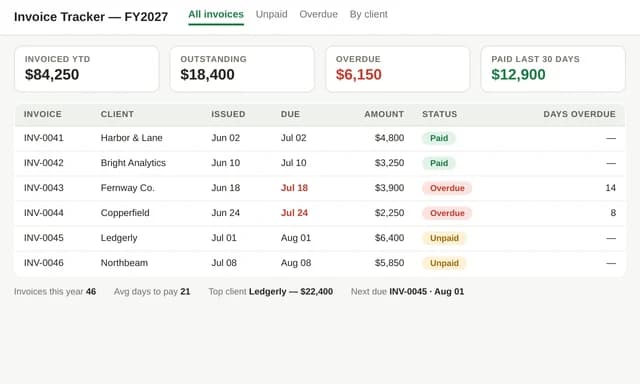
Yes. Upload or paste your data and ask Huggle to clean it, add formulas, build a summary, or turn it into a tracker. The result is a new editable workbook.

05

Is there a free plan?

Yes. A free Huggle account includes an allowance with no card required, enough to generate a working spreadsheet. Paid plans start at $10/month launch pricing and include every frontier model.

06

How is this different from the spreadsheet templates?

The spreadsheet templates are finished example workbooks, such as the SaaS runway model, that you open and adapt. The generator starts from your own brief. Both produce the same editable workbook with live formulas.

Try the AI spreadsheet generator

Describe the work once. Edit the file the moment it lands.

Start free with no card. Documents, decks, spreadsheets, LaTeX, databases, and websites, every frontier model included, from $10 a month when you upgrade.