AI database builderStructured trackers and CRMs from a prompt
Huggle's AI database builder turns a description of how your work flows into a working database: tables with typed fields, relations between them, the views you check each week, and starter records so it is not empty on day one. CRMs, content calendars, applicant trackers, and project trackers are the common shapes. The database opens as an editable artifact in your workspace, so you add a field or a view by asking, and it stays the system of record you share with your team. A free account with no card lets you build your first one.
Free to start, no card required. Paid plans from $10 a month with every frontier model included. See pricing.
01What you get
What Huggle's AI database builder produces
A finished database you can open, edit, and share, not raw model output you still have to assemble somewhere else.
Schema from your workflow, not a blank grid
Describe the process and Huggle proposes the tables, field types, stages, and relations that fit it. A CRM gets companies, contacts, and deals that link; a hiring tracker gets candidates, roles, and interviews.
Views you will actually check
Pipeline by stage, records by owner, due this week, overdue. Views are set up with the filters and sorts already applied so the database is useful on the first open.
Starter records and imports
Huggle seeds realistic example rows so you can see the structure working, and imports a spreadsheet or CSV you already have into the right fields.
Change it by asking
Add a status, split a field, create a view for a new report, or attach a note template. The database updates in place and your existing records stay intact.
02Examples
What people generate with the AI database builder
Each example is a prompt you can open in the composer as written. Huggle asks for the details it needs before it builds anything.
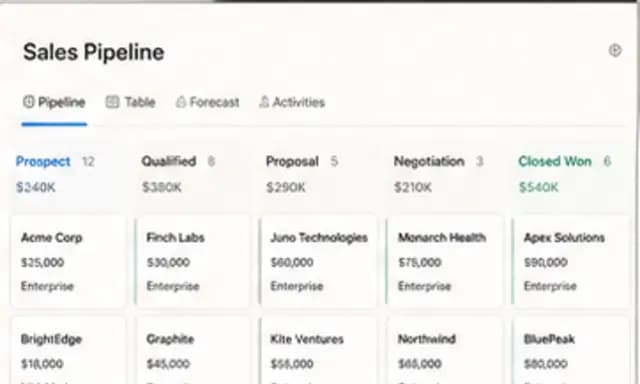
Agency or sales CRM
01Companies, contacts, and deals linked together, with a pipeline view by stage and a follow-up view by owner.
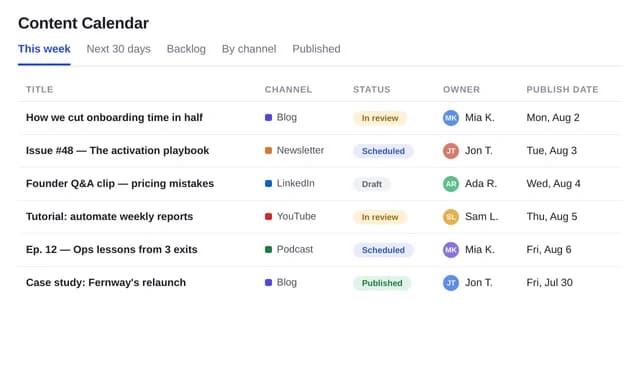
Content calendar
02Every post and article by channel, status, owner, and publish date, with a calendar view and a backlog view.
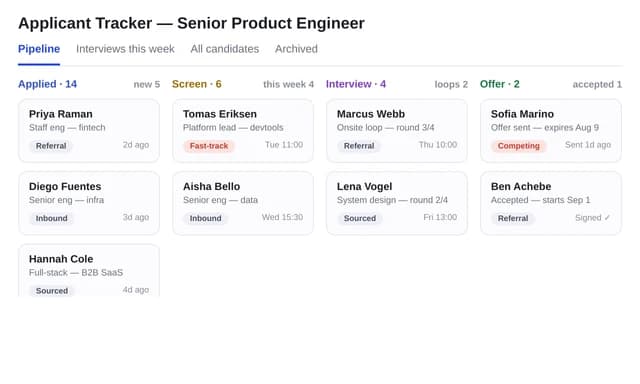
Applicant tracker
03Candidates, roles, and interview rounds with scorecards, so hiring decisions come from the record rather than a thread.
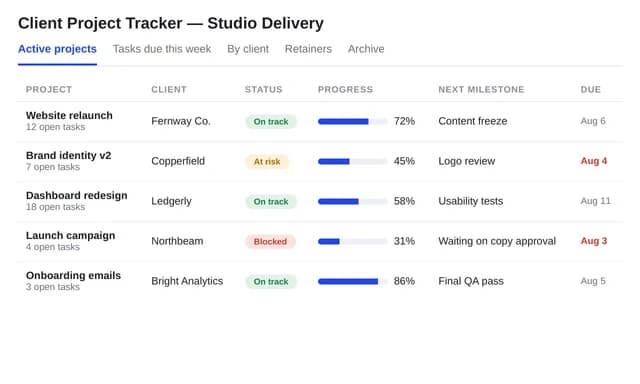
Client project tracker
04Projects, milestones, and tasks with owners and due dates, plus a client-facing view you can share.
03How it works
From a sentence to a finished database
Four steps, one workspace. The file is real from the first pass and stays editable for as long as you keep working on it.
- Step 1
Describe the outcome
Write a sentence or two about what you need, who it is for, and the facts you already have. Or open a template and swap in your own situation.
- Step 2
Answer a few questions
Huggle asks for the missing details it needs, such as audience, scope, numbers, and tone, so the first draft is specific to you rather than a generic template.
- Step 3
Watch the file take shape
Pick Flash for speed or Max for power. Huggle routes across frontier models and builds the artifact as a real file in the preview surface.
- Step 4
Edit, then share or export
Revise in place, ask Huggle to change a section, then share a link or export. The file stays editable; there is no transcript to copy out of.
04Comparison
Huggle vs. a spreadsheet or a no-code database template
| Criterion | Huggle | Spreadsheet or database template |
|---|---|---|
| What you get | Tables, typed fields, relations, views, and starter records built from your workflow | A generic template whose fields you rename, or a flat sheet that grows columns |
| Relations | Linked records between tables from the start | Lookups and duplicated columns you maintain by hand |
| Views | Pipeline, owner, and due-date views configured on creation | Filters you set up and re-create per tab |
| Changes | Describe the change; fields and views update with records intact | Manual restructuring, often breaking formulas or filters |
| Getting started | Starter records and CSV import so the database is useful on day one | An empty grid |
| Beyond the database | The same workspace produces the report, deck, and proposal that draw on the data | A database-only tool |
05Finished examples
Start from a database Huggle already made
Organize contacts, content, candidates, and projects. Every template opens the full brief in the composer so you swap in your own situation.
06FAQ
AI database builder questions
01What can the AI database builder create?
Structured trackers and record systems: CRMs, content calendars, applicant trackers, project trackers, inventories, and similar. Each has typed fields, relations between tables, and saved views. It is built for teams and individuals, not for replacing a production application database.
02Can I import my existing spreadsheet?
Yes. Paste or upload a CSV or spreadsheet and Huggle maps the columns to typed fields, proposes the structure, and loads the rows as records.
03Can I change the structure after it is built?
Yes. Add or rename fields, add a stage, create a view, or split a table by asking. Existing records are preserved through the change.
04Can my team use the database?
Yes. Share the database from your workspace so others can view and update records. The views you set up are shared with it.
05Is there a free AI database builder plan?
Yes. A free Huggle account includes an allowance with no card required, enough to build a first database with starter records. Paid plans start at $10/month launch pricing and include every frontier model.
06How is a Huggle database different from a spreadsheet?
A spreadsheet is a grid of cells with formulas, good for models and calculations. A database has typed fields, records that link to each other, and views over the same data. If your work is mostly numbers, use the AI spreadsheet generator; if it is mostly records with status and owners, build a database.
Try the AI database builder
Describe the work once. Edit the file the moment it lands.
Start free with no card. Documents, decks, spreadsheets, LaTeX, databases, and websites, every frontier model included, from $10 a month when you upgrade.