Huggle vs Manus: The Best Manus Alternative for Finished Work
Huggle is the best Manus alternative for everyday work that needs to end as a finished, editable file. Manus is a general autonomous agent that runs long multi-step tasks in a cloud sandbox and returns a deliverable, from $20 per month for 4,000 credits. Huggle is a workspace: it routes across frontier models, produces an editable document, deck, spreadsheet, LaTeX paper, database, or website, and lets you keep editing without re-running the task. Free with no card; paid from $10 per month.
By Huggle Editorial, updated . Manus pricing and features verified against official sources. Where Manus is the better tool, this page says so.
01At a glance
Huggle vs Manus at a glance
The short version. The "Edge" column names which product is stronger for that criterion, or says so when it depends on the job.
Huggle from
$10/mo
Flash plan, launch price ($25/month list). Free plan needs no card.
Manus from
$20/mo
Pro (entry tier), from 4,000 credits/month.
13 criteria compared
5 Huggle · 3 Manus
- Huggle leads
- 5
- Comparable or depends
- 5
- Manus leads
- 3
Verified
4 official sources, linked in the ledger.
| Criterion | Huggle | Manus | Edge |
|---|---|---|---|
| Best for | Students, researchers, consultants, marketers, and small teams who need a finished, editable file | Delegating long, multi-step research and browser tasks to an autonomous agent | Depends on the job |
| Core shape | AI workspace with editors, templates, agents, and scheduled automations | Autonomous agent in a cloud sandbox with Agent Mode and Chat Mode | Depends on the job |
| Model access | Every frontier model included; choose Flash or Max and Huggle routes the request | Manus 1.6 Lite on Free; Manus 1.6 and 1.6 Max on Pro and Team | Huggle |
| Free plan | Free allowance, no card required | 300 credits daily, 1 concurrent task, 2 scheduled tasks, Lite model only | Comparable |
| Entry paid price | Flash $10/month launch price ($25 list); Starter $20/month with $35 included credits | Pro from $20/month with 4,000 credits | Huggle |
| Editing after generation | Every artifact opens as an editable file in the workspace | Deliverables returned from a run; changes usually mean another agent pass | Huggle |
| Long-running autonomy | Agents and scheduled automations inside the workspace | Purpose-built for it: 20 concurrent and 20 scheduled tasks on Pro | Manus |
| Team plan | No published per-seat team plan | From $20 per seat/month with SSO and training opt-out | Manus |
02Two different bets
Manus sells breadth of capability. Huggle sells the finished file.
Both products put frontier models to work. They disagree about what should come out the other end, and that shapes everything from pricing to how you edit.
What is Manus?
Manus describes itself with the line "Less structure, more intelligence": a general AI agent you brief like a contractor.
Manus is a general-purpose autonomous agent. In Agent Mode you give it a goal and it plans and executes the task end to end inside a cloud sandbox: browsing the web, reading and writing files, running code, doing advanced or wide research, generating slides, and deploying websites, then hands back a deliverable for review. Chat Mode is a lighter conversational surface. Pro plans unlock the Manus 1.6 and 1.6 Max models, twenty concurrent tasks, and twenty scheduled tasks; a Team plan adds SSO, data-training opt-out, usage analytics, and shared slide templates. Usage is metered in credits that scale with task complexity and duration.
Manus is best for
- Researchers and analysts who want to delegate a long multi-step research task and come back to a report
- Operators who need an agent to operate a browser, process files, and run code without supervision
- Users who want many tasks running in parallel (Pro supports twenty concurrent tasks)
- Teams that need SSO, data-training opt-out, and usage analytics on a per-seat plan
Strengths
- Deep task autonomy: plan, execute, verify, and deliver without turn-by-turn steering
- Wide Research and Advanced Research modes for high-intensity research tasks
- Concurrency and scheduling: twenty concurrent and twenty scheduled tasks on Pro
- A generous free plan: 300 credits refreshed daily, one concurrent task, two scheduled tasks
- Team plan from $20 per seat per month with SSO and data-training opt-out
- Add-on credit packs never expire, unlike monthly plan credits
Limitations
- Credit consumption depends on task complexity and duration, so a long agentic run can cost far more than a short one and the monthly total is hard to forecast
- Free users get only the Manus 1.6 Lite model in Agent Mode; the full 1.6 and 1.6 Max models require Pro
- Outputs come back as deliverables from a run. Changing a paragraph or a slide generally means asking the agent again rather than editing in place
- Manus is a general agent rather than an editor, so there is no dedicated LaTeX, spreadsheet-formula, or database editing surface
What is Huggle?
The AI workspace for everyday work. Artifacts over chat.
Huggle is the AI workspace for everyday work. You describe the outcome once and Huggle researches, drafts, and delivers a finished, editable artifact: a document, slide deck, spreadsheet, LaTeX paper, database, image, video, or a live website. Instead of choosing a model vendor you choose a capability tier, Flash for speed or Max for power, and Huggle routes across frontier models behind the scenes. Agents and scheduled automations handle recurring work through connectors such as GitHub, Linear, and Google Workspace.
Huggle is best for
- Students who need essays, homework documents, decks, and study material they can hand in
- Researchers and academics who need LaTeX papers, literature summaries, figures, and data tables that compile
- Consultants and freelancers producing client decks, proposals, reports, and trackers
- Marketers and creators who need landing pages, campaign assets, images, and video
- Small teams and operators who want recurring work to run on autopilot through agents and scheduled automations
Strengths
- Artifacts over chat: every request ends as a real file you can present, publish, or export, not a transcript to copy elsewhere
- Every frontier model under one subscription, routed by capability tier so you never pick a vendor per task
- Editing is part of the workflow: revise the structure, content, and layout of the artifact in place instead of re-running the whole job
- Predictable pricing with a free plan that needs no card, a $10/month launch tier, and dollar-denominated included credits on paid plans
- A public template library and free AI tools so you can see the finished output before you sign up
- Built for academic work: LaTeX that compiles, citation generators, thesis and lab-report templates
Limitations
- Huggle is a workspace first, not a general-purpose autonomous agent; it will not place phone calls or operate arbitrary third-party websites on your behalf
- Media generation covers images, video, and voice, but Huggle does not try to bundle dozens of named image and video models
- Huggle does not publish a per-seat team plan with SSO today
Artifacts Huggle produces
- 01Documents, essays, and reports
- 02Slide decks and presentations
- 03Spreadsheets with real formulas and formatting
- 04LaTeX papers that compile, with figures, tables, and bibliographies
- 05Databases and structured trackers
- 06Live websites and small apps deployed to a URL
- 07Images, video, and voice
03Feature by feature
Huggle vs Manus: feature comparison
Criterion by criterion. Manus details reflect its official pricing and help pages as of September 14, 2026.
- Huggle leads
- 5
- Comparable or depends
- 5
- Manus leads
- 3
| Criterion | Huggle | Manus | Edge |
|---|---|---|---|
| Product shape | A workspace organized around the artifact. You brief it, the file appears in an editor, and you keep working on it. | A general agent. You brief it, it runs in a sandbox, and a deliverable comes back for review. | Depends on the job |
| Research | Research is folded into artifact generation: the deck or paper arrives with the research already applied. | Advanced Research and Wide Research modes designed for deep, high-intensity research runs. | Manus |
| Documents and reports | Structured, editable documents with public proposal, report, case-study, and business-plan templates. | Reports produced as deliverables from an agent run. | Huggle |
| Slides | Editable decks from a brief, with pitch, sales, board, and strategy templates. | Slide generation with shared slide templates on the Team plan. | Comparable |
| Spreadsheets and databases | Spreadsheets with working formulas and relational databases such as CRMs and trackers, editable in place. | Data work happens inside agent runs and code; no dedicated spreadsheet or database editor on the published plan pages. | Huggle |
| LaTeX and academic work | LaTeX papers, theses, and lab reports that compile, plus free citation and BibTeX generators. | General-purpose; no dedicated LaTeX or citation workflow on the published plan pages. | Huggle |
| Websites and apps | Live websites and small apps deployed to a URL, with landing page templates. | Professional website deployment included on Pro and Team. | Comparable |
| Browser and computer use | Not a focus; connectors to GitHub, Linear, and Google Workspace cover integrations. | Operates a browser and a sandboxed computer autonomously as part of a task. | Manus |
| Model selection | Every frontier model included; Flash or Max capability tier per request. | Manus's own 1.6 model family; Lite on Free, 1.6 and Max on Pro. | Huggle |
| Pricing predictability | Fixed monthly price with a dollar-denominated included allowance; overage continues through wallet credits. | Credits scale with task complexity and duration; add-on packs never expire, plan credits reset monthly. | Huggle |
| Concurrency and scheduling | Scheduled automations and agents; no published concurrency cap. | 20 concurrent tasks and 20 scheduled tasks on Pro; 1 and 2 on Free. | Depends on the job |
| Team and admin | Built for individuals and small teams; no published per-seat team plan. | Team plan from $20 per seat with SSO, data-training opt-out, usage analytics, and access control. | Manus |
| Try before you pay | Free plan with no card, a public template gallery, and free AI tools that run without an account. | Free plan with 300 daily credits and a 7-day trial on the $40 Pro tier. | Comparable |
04Pricing
Huggle vs Manus pricing
Published list prices in USD. Huggle prices come from its published pricing sheet (huggle.ai/pricing.md); Manus prices come from its official pricing pages, linked in the sources below.
Huggle plans
5 tiers- Every paid plan includes every frontier model; you pick a Flash or Max capability tier per request instead of a vendor.
- Each paid plan includes a monthly credit allowance in dollars. Usage beyond it continues through wallet credits rather than stopping your work.
- Annual billing is charged at the price of ten months, so every plan is effectively two months free on annual.
- The free account has a real allowance and asks for no card, so you can generate a finished document or deck before deciding.
Manus plans
4 tiers- Credits refill at the start of each billing cycle based on your plan. Manus recommends Chat Mode for simple questions because the full autonomous agent consumes more credits.
- Plan credits reset monthly. Purchased add-on credit packs never expire.
- Manus's help center notes the original Basic and Plus plans were renamed to Pro, and that the live pricing page is authoritative.
- The Team plan includes a shared credit pool that every member can draw from.
05The verdict
Should you choose Huggle or Manus?
Neither answer is wrong. Match the tool to the shape of the work you do most weeks.
Choose Huggle if
5 signals- The deliverable is a document, deck, spreadsheet, LaTeX paper, database, or website you will keep editing
- You want to change one section or one slide without re-running the whole task
- You want every frontier model included, chosen for you by capability tier
- You do academic work that has to compile and cite correctly
- You want a fixed monthly price with a dollar-denominated allowance
Stay with Manus if
4 signals- You want to hand off a long, multi-step research or browser task and come back to a finished report
- You need twenty tasks running in parallel or an agent operating a computer on your behalf
- You need a per-seat team plan with SSO and data-training opt-out today
- You prefer a brief-and-review relationship with an agent over working inside an editor
06The long read
Huggle vs Manus, in depth
- 01What is Manus?
- 02What is Huggle?
- 03Manus pricing vs Huggle pricing
- 04Where Manus is the better choice
- 05Where Huggle is the better choice
What is Manus?
Manus is one of the products that made "autonomous agent" concrete for non-developers. You describe a goal, and in Agent Mode it plans the steps, opens a browser, reads and writes files, runs code, researches, builds slides or a website, and returns the result. Pro plans unlock the full Manus 1.6 and 1.6 Max models, Advanced Research and Wide Research, professional website deployment, and twenty concurrent and twenty scheduled tasks. A Team plan from $20 per seat adds SSO, data-training opt-out, usage analytics, and shared slide templates.
The trade-off of the contractor model is that the work happens away from you. That is ideal when the task is long and you do not want to steer it, and less ideal when you want to nudge one paragraph or one number. Credits are consumed based on task complexity and duration, so a complex run can cost far more than a simple one. Plan credits reset monthly, while add-on credit packs never expire.
What is Huggle?
Huggle is the AI workspace for everyday work. Its organizing idea is artifacts over chat: you describe the outcome once, and Huggle researches, drafts, and delivers the file itself, whether that is a document, a slide deck, a spreadsheet with live formulas, a LaTeX paper that compiles, a database, an image or video, or a website deployed to a URL. The artifact opens in an editor so you can revise it in place instead of asking for a new run.
Every frontier model is included; you pick Flash for speed or Max for power, and Huggle routes the request to the best model for the job. Agents and scheduled automations keep recurring work going through connectors such as GitHub, Linear, and Google Workspace. The free plan needs no card, and paid plans are a fixed monthly price with a dollar-denominated credit allowance.
Manus pricing vs Huggle pricing
Manus's free plan is unusually generous on paper: 300 credits refreshed daily, one concurrent task, and two scheduled tasks, but only the Manus 1.6 Lite model in Agent Mode. Pro starts at $20 per month for 4,000 credits and $40 per month for 8,000 credits (with a 7-day trial), with higher credit tiers above that, and the Team plan starts at $20 per seat per month. Annual billing takes 17 percent off. Because credits track task complexity and duration, a handful of long research runs can use a month's allowance quickly, which is why Manus sells add-on packs that never expire.
Huggle's paid plans start with Flash at $10 per month launch price ($25 list), then Starter at $20 with $35 of included credits, Pro at $40 with $60, and Ultra at $100 with $120, with annual billing at the price of ten months. Every paid plan includes every frontier model, so there is no model gate between tiers. At the same $20 and $40 price points, Huggle gives you the full model roster and an editable artifact; Manus gives you its own 1.6 models and a run-based deliverable with more autonomy.
Where Manus is the better choice
Manus is the stronger tool when the task is genuinely autonomous: a long research sweep across many sources, a browser workflow that clicks through several sites, a batch of twenty parallel jobs, or anything you want to hand off and not touch until it is done. Its Wide Research mode and sandboxed computer are designed for exactly that, and Huggle does not position itself as a browser-operating agent. Manus also offers a per-seat Team plan with SSO, data-training opt-out, and usage analytics that Huggle does not publish an equivalent for today.
Where Huggle is the better choice
Huggle is the stronger tool when the output is a file you will keep working on. A proposal, a pitch deck, a cash-flow model, a LaTeX thesis, a CRM database, or a landing page comes back as an editable artifact, and the template gallery shows you the finished version before you commit. Academic work in particular is a Huggle strength and outside Manus's published focus: LaTeX that compiles, citation and BibTeX generators, thesis and lab-report templates. Every frontier model is included on every paid plan rather than gated by tier, and the fixed price with a dollar-denominated allowance answers the most common complaint about agent products: not knowing what a month will cost.
07In practice
Where Huggle replaces Manus
Four everyday jobs, each with the public templates and free tools you can try before creating an account. The stills are real template output.
 Compiled LaTeX paper
Researchers
01papers, theses, and lab reports
Draft a LaTeX paper with tables, figures, equations, and a bibliography that compiles, then refine each section in place.
 Business document
Consultants
02proposals you can edit before sending
Turn client facts into a scoped proposal and a strategy deck, then adjust the commercial options slide by slide.
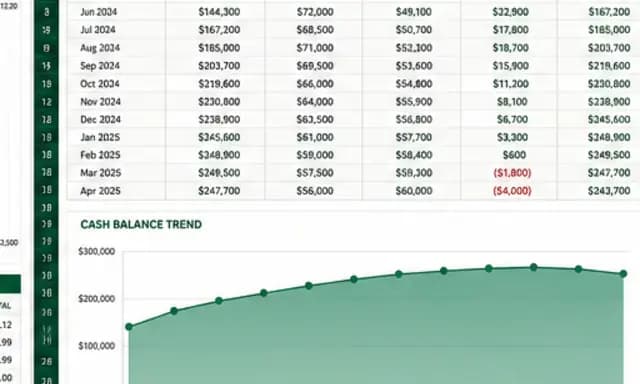 Working spreadsheet
Founders
03financial models and pitch decks
Build a 24-month runway model with live formulas and a 12-slide pitch deck built only from facts you can substantiate.
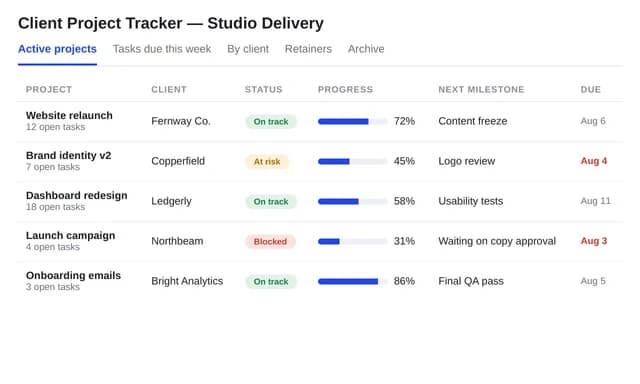 Delivery database
Operators
04trackers and recurring reports
Set up a client project tracker database and schedule a recurring status report so the work keeps going when you leave.
08Making the move
Switching from Manus to Huggle
Five steps, and nothing you generated elsewhere is lost. Most people run one real week of work on the free plan before touching a paid subscription.
- 1
Download the reports, slides, and files from your completed Manus tasks so nothing depends on the old account.
- 2
Create a free Huggle account (no card) and open the template closest to your most common deliverable, or paste the original brief into the composer.
- 3
Choose Flash for quick drafts or Max for high-stakes work; every frontier model is included on every paid plan.
- 4
Edit the artifact in place, then export, share, or publish it. Move any recurring Manus scheduled task to a Huggle scheduled automation.
- 5
Run a normal month of work on the free or Starter plan and compare the cost against your Manus credit usage before changing subscriptions.
09FAQ
Huggle vs Manus: frequently asked questions
Straight answers to the questions people type into search and into AI assistants. Prices are the ones verified on September 14, 2026.
01Is there anything better than Manus AI?
For long, autonomous research and browser tasks, Manus remains one of the strongest general agents. For everyday work that ends as an editable document, deck, spreadsheet, LaTeX paper, database, or website, Huggle is the better fit: every frontier model is included, the artifact is editable in place, and pricing is a fixed monthly fee with a free plan that needs no card.
02Is Manus AI still the best?
It is still among the best at what it was built for: delegating a multi-step task to an agent that plans, executes, and returns a deliverable. Whether it is best for you depends on whether you want a contractor you brief and review or a workspace where you keep editing the file. Huggle is built for the second case.
03Is Manus AI free?
Manus has a free plan with 300 credits refreshed daily, one concurrent task, two scheduled tasks, and access to the Manus 1.6 Lite model in Agent Mode. Huggle's free plan also needs no card and includes an allowance for documents, spreadsheets, slides, LaTeX, websites, databases, and media.
04How much does Manus cost compared with Huggle?
Manus: Free; Pro from $20 per month with 4,000 credits or $40 per month with 8,000 credits; Team from $20 per seat per month; 17 percent off annually. Huggle: Free; Flash $10 per month launch price ($25 list); Starter $20; Pro $40; Ultra $100; annual billing at the price of ten months. Prices verified September 2026.
05Which is better for students, Manus or Huggle?
Huggle. Students need essays, homework documents, decks, and LaTeX that compile, with citations formatted correctly, and Huggle publishes templates and free citation tools for exactly that. Manus is stronger when the assignment is a long research sweep you want to hand off entirely.
06Can Huggle run long autonomous tasks like Manus?
Huggle includes agents and scheduled automations with connectors to GitHub, Linear, and Google Workspace, so recurring work keeps going when you leave. It does not position itself as a browser-operating general agent, and it does not publish a twenty-task concurrency figure the way Manus Pro does.
07What can Manus do that Huggle cannot?
Operate a browser and a sandboxed computer autonomously, run twenty tasks in parallel on Pro, offer Wide Research for high-intensity research sweeps, and sell a per-seat Team plan with SSO and data-training opt-out. If those are central to your work, Manus is the right tool.
08How do I move my work from Manus to Huggle?
Download the outputs from your completed Manus tasks, open a free Huggle account, and paste the brief or upload the file. The result opens as an editable artifact you can keep refining, and any recurring task can become a Huggle scheduled automation.
10Sources and methodology
Every claim on this page has a receipt
We compare published capabilities and list prices, not benchmarks or star ratings. Manus facts were checked against the official pages below on September 14, 2026.
- 01What is the current membership pricing for Manus?Manus Help Center · accessed
- 02Plans and PricingManus Docs · accessed
- 03Manus: Hands On AIManus · accessed
- 04Huggle pricingHuggle · accessed
Primary sources only
Manus claims come from its own pricing, help center, and product pages. Nothing is paraphrased from round-ups.
Dated, re-verified
Every figure carries the date it was checked. When Manus changes a price or a plan, the date moves with it.
We say when they win
3 of 13 criteria go to Manus above. A comparison that never loses a row is an advertisement.
Huggle facts come from its published pricing sheet (huggle.ai/pricing.md) and the product itself. If something is out of date, use the contact link in the footer and we will correct it.
The Manus alternative for finished work
Describe the work once. Edit the file the moment it lands.
Start free with no card. Documents, decks, spreadsheets, LaTeX, databases, and websites, every frontier model included, from $10 a month when you upgrade.