Spreadsheet templates

Spreadsheet templates with working formulas

Build working models with formulas, scenarios, editable assumptions, and decision-ready dashboards. Each example below is a real Huggle artifact with the creation recipe ready to personalize.

Start with a proven spreadsheet

4 artifacts

Common uses

  • 01Financial planning and runway modeling
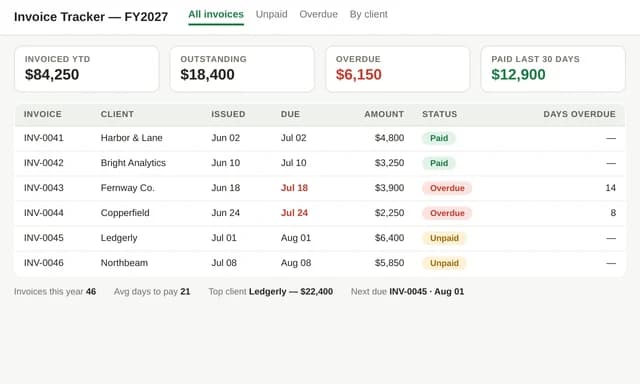
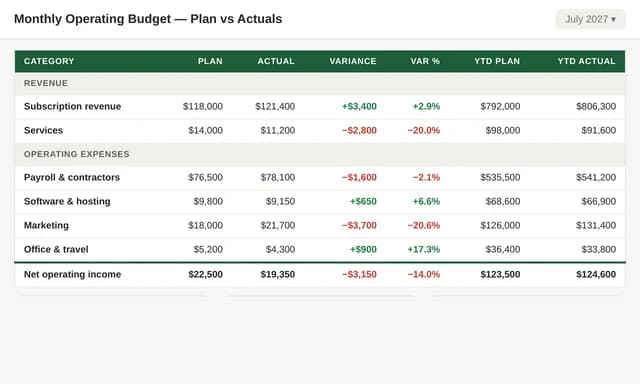
  • 02Invoice registers and monthly operating budgets
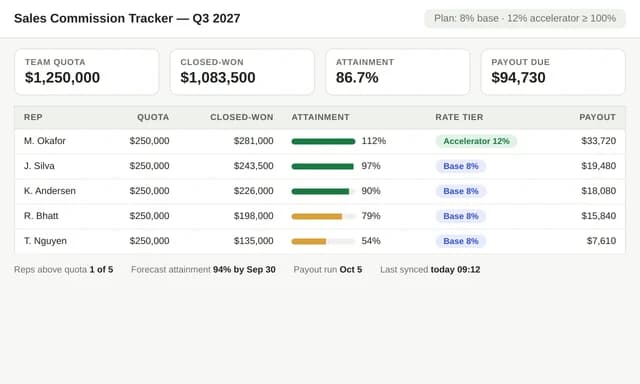
  • 03Sales commission trackers and scenario dashboards

How these templates work

What an AI spreadsheet generator should build

An AI spreadsheet generator is only as good as the formulas it writes. Huggle spreadsheet templates produce working workbooks: assumptions you can edit, monthly calculations that stay linked, scenario cases, and a dashboard that updates when inputs change. You are not downloading a static grid of example numbers. You are starting from a model you can inspect and revise.

Why founders search for a SaaS financial model template

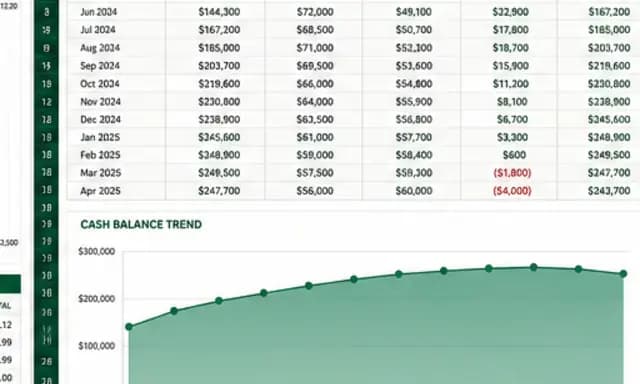
A 24-month cash-flow and runway model is the artifact investors and operators actually use. Head terms like “SaaS financial model template” are owned by downloadable Excel files. Huggle’s difference is generation: the SaaS cash-flow and runway model template asks for your opening cash, MRR, growth, margin, and cost plan, then builds Base, Conservative, and Aggressive cases with a runway warning.

How Huggle keeps the model editable

The creation brief lists the sheets, formulas, and charts the model must include. After generation you can change an assumption, ask Huggle to add a hiring step-up, or rebuild a chart. That is the gap between a downloaded template and an AI-generated spreadsheet you continue to operate.

Start with SaaS financial model template with 24-month runway scenarios, freelance invoice tracker spreadsheet, monthly operating budget spreadsheet template, or sales commission tracker spreadsheet.

Or describe your own

Need a spreadsheet that isn't here?

Describe it in your own words and Huggle will build it from scratch — the same way it built every example on this page.

Open Huggle