Delivery database template
Build a client project tracker with delivery views
Organize clients, projects, tasks, and deadlines.
Make this with my informationOpens an editable creation brief. Nothing runs until you submit.
- Format
- Delivery database
- Last updated
- August 31, 2026
- You bring
- 3 inputs
- By
- Huggle Editorial
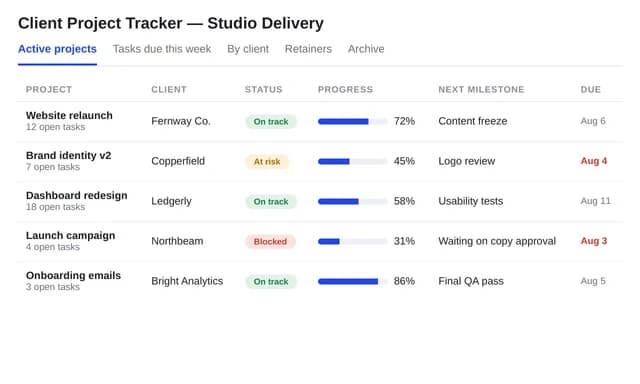
The creation brief
This template is for studios who sold the work and now have to deliver it. Huggle links clients, projects, and tasks so the board and the client list stay in sync.
Creation recipe
Build a client project tracker for a fictional design studio. Tables: clients, projects, tasks, owners, statuses. Seed 6 fictional clients and 10 projects. Views: active projects, tasks due this week, by client. Include kickoff, delivery, and closed statuses. Do not invent billable hours.
What Huggle creates
- Clients, projects, and tasks in one relational system
- Active, this-week, and by-client views
- Statuses from kickoff to closed
What to bring
- 01How you name projects and the statuses you use
- 02Whether tasks are internal or client-visible
- 03Who owns delivery
Overview
What is a client project tracker?
A client project tracker is a database that links clients, projects, and tasks so a studio can see what is active, what is due this week, and what each client owns. An AI project tracker should keep those tables relational so a renamed client updates every project.
What's included
What this AI project tracker builder creates
Clients and projects
A project belongs to a client. The example seeds six fictional clients and ten projects. Pair this with the agency CRM when the same company is also a sales opportunity, and with the SOW so delivery matches what was sold.
Tasks and owners
Tasks have due dates and owners. This-week is the stand-up view. Do not invent billable hours in the seed — the brief forbids it.
Statuses
Kickoff, delivery, closed — or your list. Same adoption rule as any CRM: unused statuses mean a dead board, and PMI’s wasted-dollar figure is what a dead board costs.
By-client view
When a client asks ‘where are we?’, this view is the answer. Active projects is the studio-level answer.
Comparison
Huggle vs. a Trello board plus a client list
Separate tools drift. This generator keeps clients, projects, and tasks in one relational system.
| Criterion | Huggle | Static template |
|---|---|---|
| Data model | Clients, projects, and tasks linked | A board that does not know the client record |
| Views | Active, this week, and by client | One board per client you forget to update |
| Hours | Not invented in the seed | A fake 40-hour column |
| Revision | Ask Huggle to add a blocker field | Another Trello power-up |
Sources
Sources and benchmarks
- PMI’s Pulse of the Profession found organizations waste 9.9% of every dollar invested due to poor project performance — $99 million for every $1 billion. PMI, Pulse of the Profession 2018
How it works
From example to your finished artifact
- 01
Start from the proven recipe
Open Huggle with the complete creation brief already in the composer.
- 02
Add your context
Answer a few focused questions so the structure, content, and visual direction fit your situation.
- 03
Create and refine
Generate an editable artifact, then ask Huggle to revise it until it is ready to use.
Use the recipe
Make a version that belongs to your work.
Huggle will ask for the missing context, then create an editable database you can keep refining.
Frequently asked questions
- What is an AI project tracker?
- It builds a delivery database from your client and project process. Huggle creates the tables and views; you still run the work.
- How is this different from the agency CRM template?
- The CRM is for pipeline and proposals. This tracker is for work you already sold. Many studios run both.
- Can clients see the board?
- Only if you decide to share a view. The default is an internal delivery system.
- Does it track time?
- Not by default. Ask for a time field if you need it. Do not seed fake hours.
- Is the database editable after it is generated?
- Yes. Add a milestone table or ask Huggle to match your SOW phases.
- What information do I need to bring?
- Bring project naming, statuses, whether tasks are client-visible, and who owns delivery.
- Will the seed projects look like real clients?
- They are fictional studio jobs so you can click the views. Replace them.
- How do I use this client project tracker?
- Open Huggle with the creation brief in the composer, set your statuses and owners, and submit. Load live projects after you like the views.
Related templates
2 artifacts
Agency CRM
Track contacts, deals, and follow-ups in a connected database.
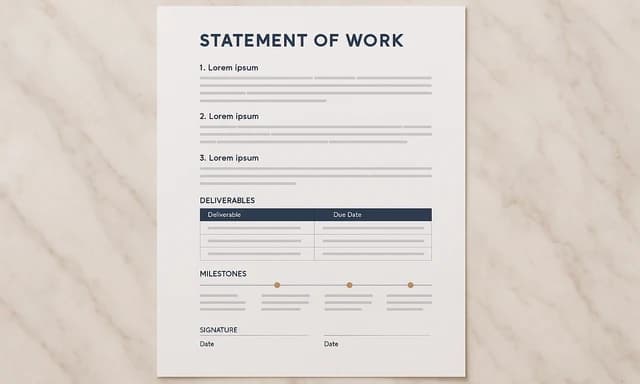
Statement of work
Define project deliverables, deadlines, fees, and exclusions.
Also explore agency CRM database template with pipeline views and statement of work template with scope and fees.