Working spreadsheet template
Build an invoice tracker with unpaid and overdue views
Track invoices, payments, and overdue balances.
Make this with my informationOpens an editable creation brief. Nothing runs until you submit.
- Format
- Working spreadsheet
- Last updated
- August 31, 2026
- You bring
- 3 inputs
- By
- Huggle Editorial
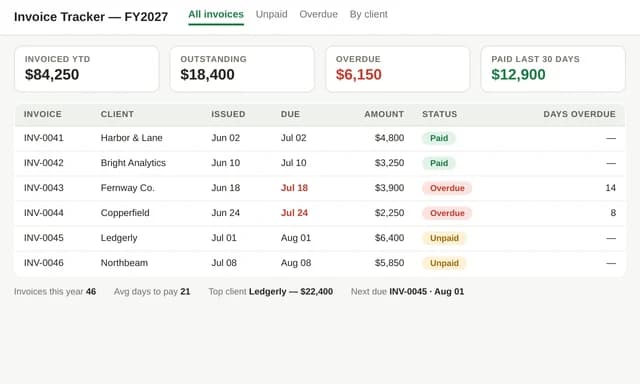
The creation brief
This template is for freelancers and small studios who still invoice from a list. Huggle builds the formulas for status, tax, and aging from your rate card.
Creation recipe
Build an invoice tracker spreadsheet for a fictional studio billing in USD. Include columns for invoice number, client, issue date, due date, amount, tax, status, and days overdue. Add summary totals for outstanding and overdue, a status filter, and sample invoices using fictional clients. Highlight editable rate and tax inputs. Do not invent payment-processor fees.
What Huggle creates
- Invoice register with status and aging formulas
- Outstanding and overdue totals
- Sample rows you replace with real invoices
What to bring
- 01Currency, tax rate, and how you number invoices
- 02Statuses you actually use
- 03Any clients or open invoices to load
Overview
What is an invoice tracker spreadsheet?
An invoice tracker is a spreadsheet that lists invoices, due dates, amounts, and payment status so you can see what is outstanding and overdue. Aging is usually today minus the due date for unpaid rows. An AI invoice generator should write those formulas, not a static sample table.
What's included
What this AI invoice spreadsheet generator builds
Invoice register
Each row is an invoice: number, client, dates, amount, tax, status. The example uses fictional studio clients. Your numbering scheme should match what you put on the PDF. Pair this with the statement-of-work template so invoice lines match the SOW.
Aging and overdue warning
Days overdue should be a formula, not a typed number. Unpaid rows past the due date roll into an overdue total. That total is the number you check on Monday.
Tax and editable inputs
Tax rate lives in a highlighted input so you can change it without rewriting rows. The brief does not invent processor fees. Add Stripe or PayPal fees only if you actually pay them.
Filters you will use
Status and client filters keep a 200-row register usable. If you later need a database, the client project tracker template is the next step.
Comparison
Huggle vs. a downloaded invoice Excel file
Accounting blogs ship static invoice lists. This generator builds aging formulas from your tax rate and statuses.
| Criterion | Huggle | Static template |
|---|---|---|
| Starting point | A working register with outstanding and overdue totals | A pretty invoice PDF plus an empty log |
| Aging | Days overdue calculated from due date and status | You type overdue by hand |
| Tax | A single editable rate applied in formulas | Hard-coded sample percentages |
| Revision | Ask Huggle to add a currency column or a year filter | Manual spreadsheet work |
Sources
Sources and benchmarks
- Intuit QuickBooks’ 2025 late payments report found 56% of U.S. small businesses were owed money from unpaid invoices — an average of $17,500 per business — and 47% had invoices overdue by more than 30 days. Intuit QuickBooks, Small Business Late Payments Report 2025
How it works
From example to your finished artifact
- 01
Start from the proven recipe
Open Huggle with the complete creation brief already in the composer.
- 02
Add your context
Answer a few focused questions so the structure, content, and visual direction fit your situation.
- 03
Create and refine
Generate an editable artifact, then ask Huggle to revise it until it is ready to use.
Use the recipe
Make a version that belongs to your work.
Huggle will ask for the missing context, then create an editable spreadsheet you can keep refining.
Frequently asked questions
- What is an AI invoice spreadsheet generator?
- It builds a tracker with formulas for totals, tax, and aging from your billing rules. It does not replace your accountant or a full bookkeeping tool.
- How do I calculate overdue invoices?
- For unpaid invoices, overdue days = today − due date, floored at zero. Sum the amounts of those rows for the overdue total. This template writes that logic.
- Can I send invoices from this spreadsheet?
- The tracker is the register. You can still send PDFs or use Stripe. The sheet tells you what is unpaid.
- Does it handle multiple currencies?
- The example is USD. Ask Huggle to add a currency column if you bill in more than one.
- Are the formulas real?
- The brief asks for connected totals and aging. Click through after generation before you trust a Monday number.
- What information do I need to bring?
- Bring currency, tax rate, invoice numbering, the statuses you use, and any open invoices you want loaded.
- How is this different from QuickBooks?
- QuickBooks is accounting. This is a lightweight register for people who are not ready to migrate. Move up when you need tax filings and bank sync.
- How do I use this invoice tracker template?
- Open Huggle with the creation brief in the composer, set your tax rate and statuses, and submit. Replace the sample rows with live invoices.
Related templates
2 artifacts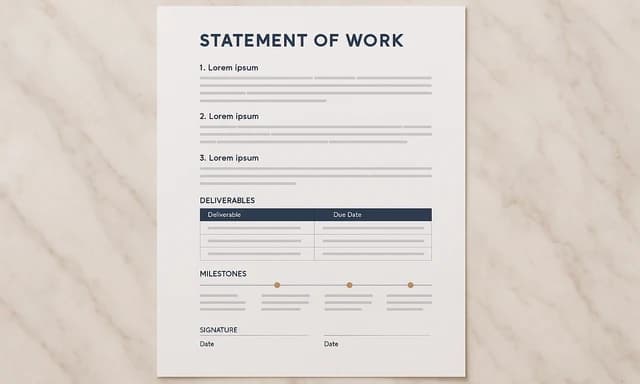
Statement of work
Define project deliverables, deadlines, fees, and exclusions.
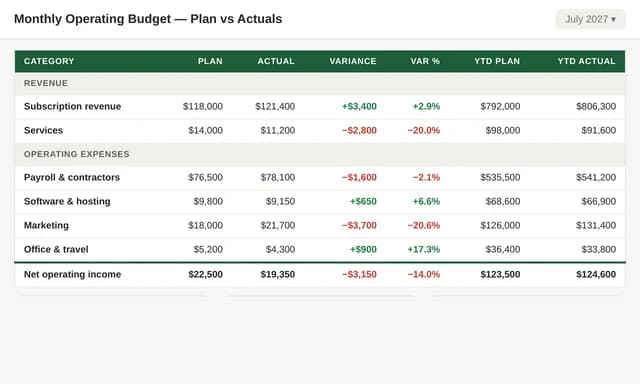
Monthly operating budget
Compare planned and actual spending over 12 months.
Also explore statement of work template with scope and fees and monthly operating budget spreadsheet template.