Working spreadsheet template
Build a monthly operating budget with actuals versus plan
Compare planned and actual spending over 12 months.
Make this with my informationOpens an editable creation brief. Nothing runs until you submit.
- Format
- Working spreadsheet
- Last updated
- August 31, 2026
- You bring
- 3 inputs
- By
- Huggle Editorial
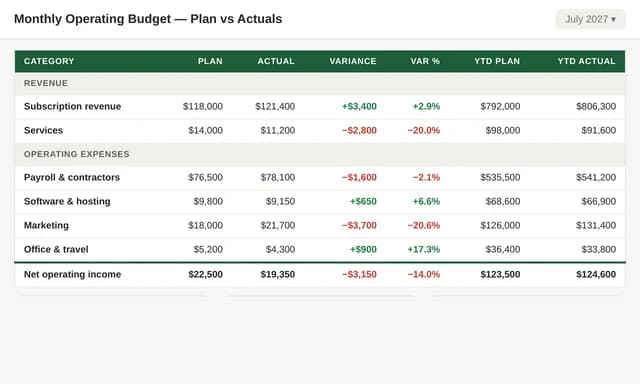
The creation brief
This template is for operators who need a budget they can run every month, not a board-only forecast. Huggle connects plan, actuals, and variance from your categories.
Creation recipe
Build a 12-month operating budget starting January 2027 for a fictional 12-person studio. Include income, payroll, tools, contractors, rent, and a miscellaneous line. Sheets: Assumptions, Monthly Budget, Actuals, Variance, Dashboard. Highlight editable plan inputs. Show variance as actual minus plan. Do not invent revenue; label demo income as illustrative.
What Huggle creates
- 12-month plan, actuals, and variance sheets
- Dashboard of spend versus plan
- Highlighted inputs you change each month
What to bring
- 01Cost categories and planned monthly amounts
- 02Any income you want on the same sheet
- 03The month the budget starts
Overview
What is a monthly operating budget?
A monthly operating budget is a spreadsheet that plans income and costs by month, then records actuals and variance. Variance is usually actual minus plan. An AI budget generator should keep plan and actuals on separate inputs so you do not overwrite the plan when you book a month.
What's included
What this AI budget spreadsheet generator builds
Assumptions and plan
Categories live on an assumptions sheet: payroll, tools, contractors, rent. The example is a 12-person studio starting January 2027. Your categories should match how you already spend, not a generic household budget.
Actuals and variance
Each month you type actuals once. Variance formulas do the comparison. That is the difference between a budget and a forecast you never revisit.
Dashboard
The dashboard should show year-to-date spend versus plan and the categories that missed. Pair this with the runway model if cash timing matters more than category totals. With the median small business holding just 27 cash buffer days, per JPMorgan Chase Institute, a boring monthly budget is survival.
Income as optional
The brief allows illustrative income only. If you do not want revenue on this sheet, keep it as a cost budget and track invoices separately.
Comparison
Huggle vs. a household budget template
Most ‘budget spreadsheet’ downloads are personal envelopes. This one is an operating budget with actuals and variance.
| Criterion | Huggle | Static template |
|---|---|---|
| Audience | A studio or small team with payroll and tools | A personal 50/30/20 sheet |
| Actuals | A dedicated actuals sheet and variance formulas | One column you overwrite |
| Horizon | Twelve months with a dashboard | Often a single month |
| Revision | Ask Huggle to add a category or a quarterly rollup | Manual column inserts |
Sources
Sources and benchmarks
- The JPMorgan Chase Institute found the median small business holds only 27 cash buffer days in reserve — less than one month of typical outflows. JPMorgan Chase Institute, “Cash Flows, Balances, and Buffer Days”
How it works
From example to your finished artifact
- 01
Start from the proven recipe
Open Huggle with the complete creation brief already in the composer.
- 02
Add your context
Answer a few focused questions so the structure, content, and visual direction fit your situation.
- 03
Create and refine
Generate an editable artifact, then ask Huggle to revise it until it is ready to use.
Use the recipe
Make a version that belongs to your work.
Huggle will ask for the missing context, then create an editable spreadsheet you can keep refining.
Frequently asked questions
- What is an AI budget spreadsheet generator?
- It builds a workbook that plans spend by month and compares actuals to plan. This template is an operating budget, not a personal envelope system.
- How do I calculate budget variance?
- Variance = actual − plan. A positive cost variance means you overspent. This template writes that formula by category and by month.
- Should income live on the same sheet?
- Only if you want a simple P&L view. Many teams keep invoices in a tracker and keep this file as costs-only.
- How is this different from a runway model?
- A runway model projects cash from growth and burn. A budget is the monthly permission slip for spend. Use both if you are a startup.
- Are the formulas real?
- The brief asks for connected plan, actuals, and variance. Review the first month after generation.
- What information do I need to bring?
- Bring cost categories, planned monthly amounts, whether income belongs here, and the start month.
- Can I use this for a household budget?
- You can retarget the categories, but the default is an operating budget for a small team.
- How do I use this monthly budget template?
- Open Huggle with the creation brief in the composer, replace the studio demo categories with yours, and submit. Enter actuals at month end.
Related templates
2 artifacts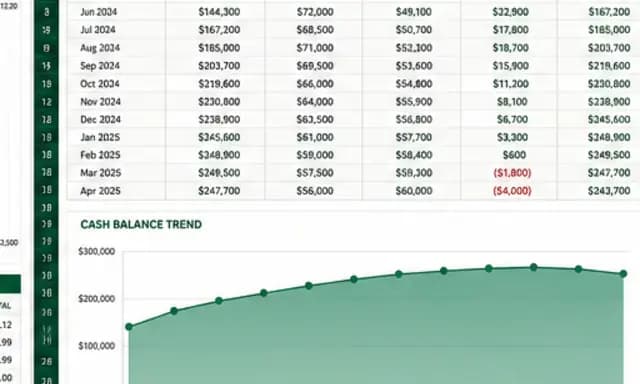
SaaS cash-flow and runway model
Forecast cash flow and runway with editable assumptions and formulas.
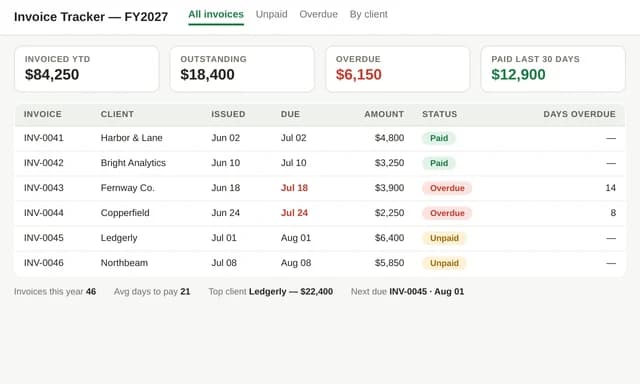
Freelance invoice tracker
Track invoices, payments, and overdue balances.
Also explore SaaS financial model template with 24-month runway scenarios and freelance invoice tracker spreadsheet.