Editorial database template
Build a content calendar with statuses and channels
Plan content by channel, owner, and publishing date.
Make this with my informationOpens an editable creation brief. Nothing runs until you submit.
- Format
- Editorial database
- Last updated
- August 31, 2026
- You bring
- 3 inputs
- By
- Huggle Editorial
The creation brief
This template is for small marketing teams who outgrew a spreadsheet grid. Huggle builds pieces, channels, and statuses as linked tables with a week view and a backlog.
Creation recipe
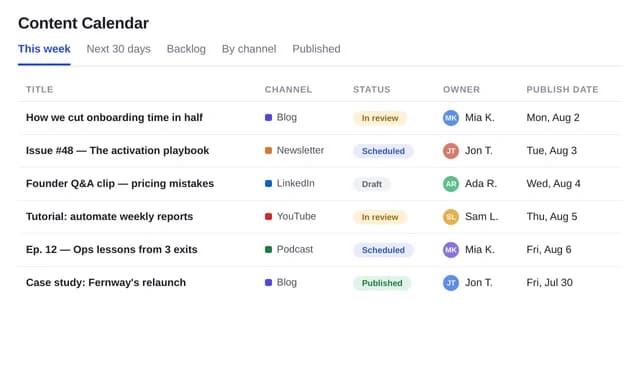
Build a content-calendar database for a fictional product studio. Tables: pieces, channels, owners, statuses. Fields for title, due date, channel, owner, status, and asset link. Seed 16 fictional pieces. Views: this week, backlog, by channel. Do not invent published URLs.
What Huggle creates
- Relational calendar with pieces, channels, and owners
- This-week, backlog, and channel views
- Seeded fictional pieces you replace
What to bring
- 01Channels and statuses you actually use
- 02Who owns drafting and publishing
- 03The horizon you plan (week or month)
Overview
What is a content calendar database?
A content calendar database is a relational system that stores each piece of content with a channel, owner, due date, and status. Views show this week, the backlog, and work by channel. An AI content calendar should create those links, not a single colored spreadsheet.
What's included
What this AI content calendar builder creates
Pieces, channels, and owners
A piece belongs to a channel and an owner. That is the difference between a calendar and a wall of dates. The example seeds 16 fictional studio pieces. Replace them before anyone treats the calendar as live.
Statuses you can change
Draft, review, scheduled, published — or your list. CMI’s research credits strategy refinement as the top driver of improved results: if the status list does not match how you work, the calendar dies in a week.
This-week and backlog views
This week is the stand-up view. Backlog is everything without a date. By-channel is how you see if LinkedIn is empty.
No invented URLs
Asset links stay empty unless you provide them. The brief forbids fake published URLs.
Comparison
Huggle vs. a Google Sheets content calendar
Sheets calendars break when two people own a channel. This generator builds a small relational editorial system.
| Criterion | Huggle | Static template |
|---|---|---|
| Data model | Pieces linked to channels and owners | One row per cell in a month grid |
| Views | This week, backlog, and by channel | A tab you duplicate each month |
| Honesty | No invented live URLs | Placeholder links that 404 |
| Revision | Ask Huggle to add an approval field | Another column that nobody fills |
Sources
Sources and benchmarks
- In Content Marketing Institute’s 2026 B2B research, 97% of marketers said they have a content strategy, and 74% of those reporting improved results credited strategy refinement — the discipline a calendar enforces. Content Marketing Institute, B2B Content Marketing Trends 2026
How it works
From example to your finished artifact
- 01
Start from the proven recipe
Open Huggle with the complete creation brief already in the composer.
- 02
Add your context
Answer a few focused questions so the structure, content, and visual direction fit your situation.
- 03
Create and refine
Generate an editable artifact, then ask Huggle to revise it until it is ready to use.
Use the recipe
Make a version that belongs to your work.
Huggle will ask for the missing context, then create an editable database you can keep refining.
Frequently asked questions
- What is an AI content calendar generator?
- It builds a database of content pieces with channels, owners, and status views from your process. Huggle seeds example rows you should replace.
- How is this different from a spreadsheet calendar?
- A sheet is a grid of dates. A database lets the same piece appear in a week view and a channel view without being copied.
- Can I plan social and blog in one calendar?
- Yes. Channels are a table. Add blog, LinkedIn, email, or launch pages as rows.
- Does it publish the content?
- No. It plans and tracks. Pair a waitlist or pricing page template when the piece is a site.
- Is the database editable after it is generated?
- Yes. Add a field, change statuses, or ask Huggle for a month view.
- What information do I need to bring?
- Bring channels, statuses, owners, and whether you plan by week or month.
- Will the seed posts look like my brand?
- No. They are fictional studio pieces so you can click the views. Delete them.
- How do I use this content calendar template?
- Open Huggle with the creation brief in the composer, set your channels and statuses, and submit. Load real pieces before the next stand-up.
Related templates
2 artifacts
Agency CRM
Track contacts, deals, and follow-ups in a connected database.
Waitlist landing page
Collect signups for your product launch.
Also explore agency CRM database template with pipeline views and waitlist landing page template with email capture.