Portfolio website template
Build a freelance portfolio website that books work
Show your projects and help clients get in touch.
Make this with my informationOpens an editable creation brief. Nothing runs until you submit.
- Format
- Portfolio website
- Last updated
- August 31, 2026
- You bring
- 3 inputs
- By
- Huggle Editorial
The creation brief
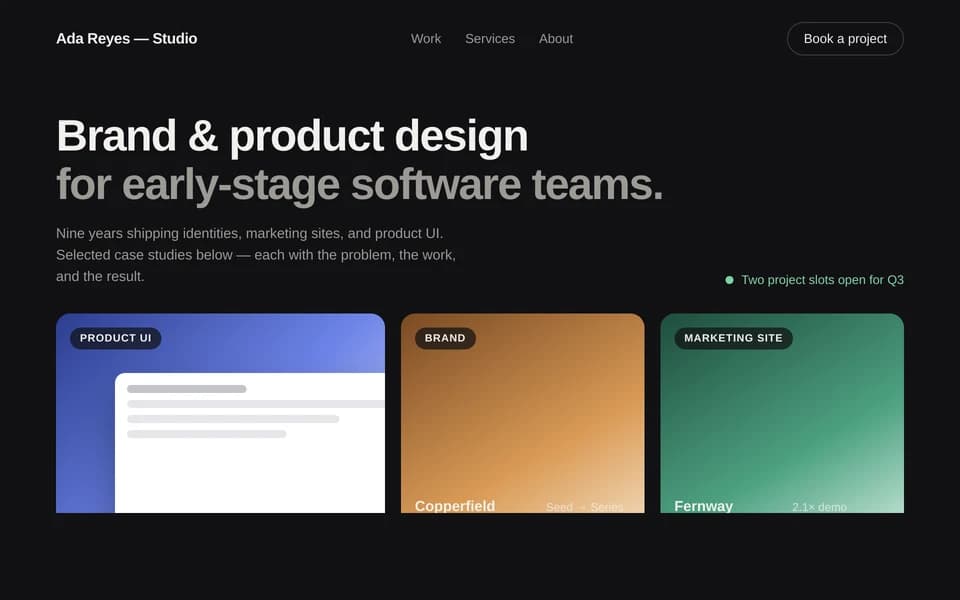
This template is for freelancers who need a site that sells the next project, not a gallery dump. Huggle structures a small set of case studies and a contact path from your selected work.
Creation recipe
Build and publish a freelance portfolio site for ‘Nia Okonkwo,’ a fictional brand designer. Include a short positioning line, four project case studies with problem/approach/outcome, a services and process section, selected testimonials using clearly fictional names, and a contact form. Use a quiet studio look: warm paper backgrounds, black type, generous whitespace. Do not invent awards or client logos; label demo projects as fictional.
What Huggle creates
- Responsive portfolio with four project stories
- Services, process, and a working contact form
- Proof blocks that stay honest about demo work
What to bring
- 01Your name, positioning, and the work you want more of
- 02Two to four projects you can describe honestly
- 03How people should contact you
Overview
What is a freelance portfolio website?
A freelance portfolio website is a personal site that shows selected work, explains how you work, and makes it easy to hire you. Unlike a social profile, it is a conversion page: positioning, project stories, and a contact path. An AI portfolio generator should return an editable site, not a PDF of screenshots.
What's included
What this AI portfolio generator creates
Positioning and selected work
The site opens with a one-line position — who you help and what you make — then four project stories. Each story has a problem, approach, and outcome. The example uses a fictional designer so you can see the shape before you drop in real work. Four projects is enough to hire from; twelve is a dump.
Services and process
A services section tells a buyer what to request. A short process section reduces ‘how do we start?’ emails. Keep both specific. ‘Brand design’ is weaker than ‘identity systems for 10–40 person studios.’
Proof and contact
Testimonials in the example use clearly fictional names. Replace them with quotes you have permission to use, or drop the block. The contact form is the conversion. With 64 million Americans freelancing, per Upwork, a portfolio that makes you easy to hire is the differentiator: if nobody can reach you, the site is a brochure.
Studio visual direction
Warm paper, black type, and whitespace keep the work in front. You can restyle toward a louder consumer look. The site is a real website you can publish.
Comparison
Huggle vs. a Squarespace portfolio theme
Portfolio themes give you a grid. This AI portfolio generator writes project stories and a contact path from the work you can actually show.
| Criterion | Huggle | Static template |
|---|---|---|
| Starting point | A finished site with four case studies and a contact form | A Squarespace or Read.cv theme you still have to fill |
| Project stories | Problem, approach, and outcome written from your brief | Image tiles with titles you write later |
| Honesty | Demo projects and quotes are labeled fictional | Easy to leave Dribbble-placeholder clients |
| Revision | Ask Huggle to swap a project or retarget the positioning | Manual CMS edits |
Sources
Sources and benchmarks
- Upwork’s Freelance Forward 2023 study found that 64 million Americans — 38% of the U.S. workforce — performed freelance work that year, an all-time high. Upwork, Freelance Forward 2023
How it works
From example to your finished artifact
- 01
Start from the proven recipe
Open Huggle with the complete creation brief already in the composer.
- 02
Add your context
Answer a few focused questions so the structure, content, and visual direction fit your situation.
- 03
Create and refine
Generate an editable artifact, then ask Huggle to revise it until it is ready to use.
Use the recipe
Make a version that belongs to your work.
Huggle will ask for the missing context, then create an editable website you can keep refining.
Frequently asked questions
- What is an AI portfolio generator?
- It turns a short studio brief into a live portfolio website with project stories and a contact form. Huggle starts from a finished example and replaces it with your work.
- How many projects should a freelance portfolio include?
- Two to four strong stories beat a long grid. This template is built for four. Add more only if they sell a different kind of work.
- Can I use this if I am not a designer?
- Yes. Change the positioning and project types — writing, research, engineering, photography. The structure is the same: selected work plus a way to hire you.
- Do I need real client names?
- Use real names only with permission. Otherwise anonymize the company and keep the outcome specific.
- Is the site editable after it is generated?
- Yes. You can replace images, rewrite a case study, or ask Huggle to change the tone before you publish.
- What information do I need to bring?
- Bring your name, the work you want more of, two to four projects you can describe, and how people should contact you.
- How is this different from Behance or Dribbble?
- Those are feeds. A portfolio site is yours: positioning, process, and a contact form that does not compete with ads.
- How do I use this portfolio website template?
- Open Huggle with the creation brief in the composer, replace the fictional studio with your work, and submit. Publish only after the projects are yours.
Related templates
2 artifacts
Customer case study
Show how you helped a customer, with results and quotes.
Waitlist landing page
Collect signups for your product launch.
Also explore customer case study template with results and waitlist landing page template with email capture.