Campaign film template
Create a cinematic product reveal for a campaign
Reveal your product with a moving camera and flowing ribbon.
Make this with my informationOpens an editable creation brief. Nothing runs until you submit.
- Format
- Campaign film
- Last updated
- September 17, 2026
- You bring
- 3 inputs
- By
- Huggle Editorial
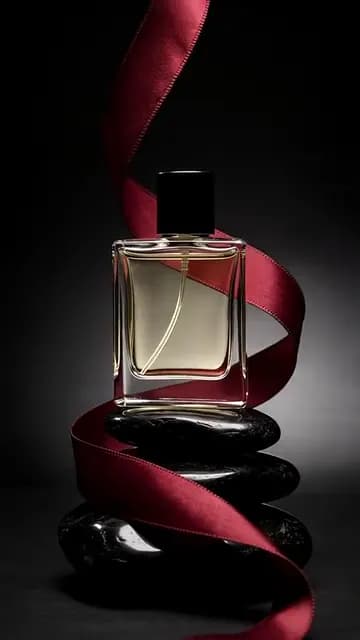
The creation brief
This template is for beauty, fragrance, and premium DTC campaigns that need a hero film before the shoot is booked. Huggle directs the orbit, the ribbon, and the light; you bring the product.
Creation recipe
Create a 9:16 vertical, 8-second cinematic product reveal. Use the attached photo only for the exact product design. Anchor frame: an elegant perfume bottle stands on black stones as the camera is already performing a slow, flawless orbit around it. 0–3 seconds: a deep red silk ribbon lifts from the base and begins to curl around the bottle in weightless motion. 3–6 seconds: the ribbon completes one turn as a narrow highlight glides across the glass and fine mist catches the light. 6–8 seconds: the ribbon settles, the orbit slows to a front three-quarter view, held for the last half second. Composition stays minimal and expensive: dark background, single key light, restrained camera movement, no extra props. No titles, captions, text, logos, or morphing.
What Huggle creates
- An 8-second 9:16 campaign film with a single continuous orbit
- A ribbon-and-highlight reveal that stays minimal and premium
- Dark studio lighting that flatters glass, metal, and packaging
What to bring
- 01A photo of the exact product and its packaging
- 02The accent element: ribbon, mist, petals, or none
- 03Your campaign palette for the background and accent
Overview
What is a cinematic product reveal?
A cinematic product reveal is a short campaign film in which the product is the only character: a slow orbit, a single key light, one accent element in motion, and nothing else in frame. It is the format luxury brands use because restraint reads as expensive, and because the product has to carry the shot without a voiceover or a claim.
What's included
What this AI campaign video generator produces
One flawless orbit
The camera is already moving at frame one and never stops until the settle. The prompt asks for restrained, continuous movement because cuts break the spell in this format.
A single accent in motion
A deep red silk ribbon lifts, curls once, and settles. Swap it for mist, petals, water, or nothing — the brief supports one accent, not a set dressing.
Highlight and mist
A narrow highlight glides across the glass while fine mist catches the light. These two details are what make glass and metal look real in generated film. Keep them even if you change everything else.
Minimal, expensive composition
Dark background, black stones, one key light, no props. Give Huggle your campaign palette and the background and accent follow while the discipline stays.
Comparison
Huggle vs. a campaign production
A campaign film is a director, a DP, and a week. This prompt produces the hero shot from a product photo so the concept is proven before anyone is booked.
| Criterion | Huggle | Static template |
|---|---|---|
| Starting point | A generated campaign shot of your product | A treatment deck and a production quote |
| Testing the concept | Ribbon, mist, and petals versions in one conversation | Storyboards and a leap of faith |
| Palette | Follows your campaign colors | Decided on set |
| Use | Social, product page, and pre-production reference | The final deliverable only |
Sources
Sources and benchmarks
- Wyzowl’s annual survey found that 91% of businesses use video as a marketing tool, and 82% of consumers say a video has convinced them to buy a product or service. Wyzowl, Video Marketing Statistics 2024
How it works
From example to your finished artifact
- 01
Start from the proven recipe
Open Huggle with the complete creation brief already in the composer.
- 02
Add your context
Answer a few focused questions so the subject, copy, and visual direction fit your situation.
- 03
Create and refine
Generate the media, then ask Huggle for a different crop, palette, hook, or another take until it is ready to use.
Use the recipe
Make a version that belongs to your work.
Huggle will ask for the missing context, then create an editable video you can keep refining.
Frequently asked questions
- What is an AI campaign video generator?
- It produces a cinematic product film from a photo and a shot list. Huggle directs the orbit, accent, and lighting from this prompt and revises on request.
- Does this only work for perfume?
- No. Any product that rewards a slow look — watches, skincare, headphones, spirits — works. Replace the bottle and keep the discipline.
- Can I change the ribbon?
- Yes. Ask for mist, petals, water, fabric, or nothing at all. The prompt supports one accent element in motion.
- What aspect ratios can I get?
- The default is 9:16 for social. Ask for 16:9 for a homepage or a 1:1 crop for feed placements.
- Can I add music or a voiceover?
- The clip is generated silent so it works as a loop. Add your campaign track in your editor or the platform.
- Is the video editable after generation?
- Yes. Ask for a slower orbit, a warmer key light, a different background material, or another take with the same setup.
- What information do I need to bring?
- Bring a photo of the product and packaging, the accent you want, and your campaign palette.
- How do I use this product reveal template?
- Open Huggle with the shot list in the composer, attach your product photo, set the palette and accent, and generate.
Related templates
3 artifacts
Product hero video
Create a studio product video for your website.
Unboxing POV
Show your product being unboxed from a first-person view.
Product launch graphic
Announce your product with a square graphic and headline.
Also explore product hero video template for a homepage loop, unboxing POV video template and product launch graphic template for Instagram.