UGC-style explainer template
Create a founder-explains-the-product video
Create a vertical video of a founder demonstrating a product.
Make this with my informationOpens an editable creation brief. Nothing runs until you submit.
- Format
- UGC-style explainer
- Last updated
- September 17, 2026
- You bring
- 3 inputs
- By
- Huggle Editorial
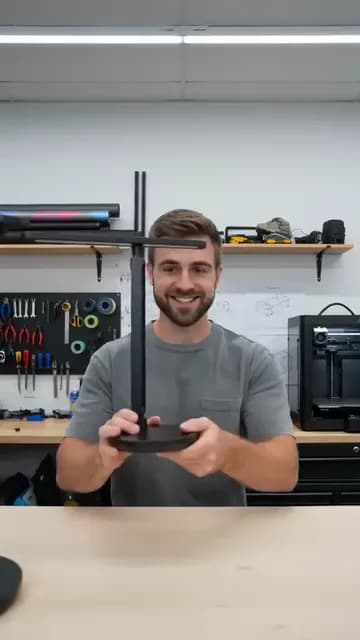
The creation brief
This template is for hardware and physical-product teams whose best ad is the founder showing why it works. Huggle directs the demonstration and the reveal; you bring the product, the person, and the mechanism.
Creation recipe
Create a 9:16 vertical, 10-second creator-style video. Use the attached photos only for the founder’s exact identity and the exact product. Anchor frame: a product designer is already standing in a bright, busy workshop holding an ergonomic desk lamp, mid-sentence. 0–3 seconds: they open with one line — “we built this because the normal version fails right here” — and point at the hinge. 3–7 seconds: they demonstrate the surprising magnetic hinge, folding and repositioning the lamp in one continuous motion, then switch the room from harsh to warm light. 7–10 seconds: a candid half-smile at the result, held for the last half second. Capture: handheld smartphone framing, natural gestures, workshop ambience and the real clicks of the mechanism. Keep the founder, lamp, and workshop identical across every shot. No titles, captions, fake text, or morphing.
What Huggle creates
- A 10-second 9:16 explainer with the founder as the presenter
- One mechanism demonstrated in a single continuous motion
- Workshop realism with consistent person, product, and space
What to bring
- 01A photo of the founder and a photo of the exact product
- 02The one mechanism or detail that makes the product different
- 03The opening line, in the founder’s voice
Overview
What is a founder product explainer?
A founder explainer is a short vertical video in which the person who built the product demonstrates the one thing that makes it different, in the place where it was made. It borrows the pacing of creator content — one line, one mechanism, one reaction — and earns trust because the presenter is accountable for the claim they are making on camera.
What's included
What this AI founder video generator produces
Mid-sentence open
The founder is already talking and already pointing at the detail. The prompt’s opening line — “we built this because the normal version fails right here” — is a template for yours: a reason, then a location on the product.
One continuous demonstration
The hinge folds, the lamp repositions, the light changes — one motion, not three cuts. Continuous action is what makes a mechanism credible in generated video. Describe yours as a single gesture.
Real workspace
A bright, busy workshop with tools in the background and ambient sound. The prompt keeps the founder, product, and room identical across shots so the clip reads as one take.
Candid close
A half-smile at the result, held for half a second. No logo, no end card. The caption and CTA belong to the platform, not the footage.
Comparison
Huggle vs. a scripted brand video
A brand video needs a crew, a script, and a day. This prompt produces the founder demo from two photos and a sentence.
| Criterion | Huggle | Static template |
|---|---|---|
| Starting point | A generated clip of your founder demonstrating your mechanism | A shot list and a production quote |
| Tone | Handheld, candid, creator pacing | Polished and easy to scroll past |
| Iteration | Ask for a new opening line or a second mechanism | Another shoot day |
| Cost of a variant | One more prompt | Edit budget |
Sources
Sources and benchmarks
- HubSpot’s State of Marketing report ranks short-form video as the format with the highest ROI, ahead of images, blog posts, and long-form video. HubSpot, State of Marketing
How it works
From example to your finished artifact
- 01
Start from the proven recipe
Open Huggle with the complete creation brief already in the composer.
- 02
Add your context
Answer a few focused questions so the subject, copy, and visual direction fit your situation.
- 03
Create and refine
Generate the media, then ask Huggle for a different crop, palette, hook, or another take until it is ready to use.
Use the recipe
Make a version that belongs to your work.
Huggle will ask for the missing context, then create an editable video you can keep refining.
Frequently asked questions
- What is an AI founder video generator?
- It produces a creator-style video of a person demonstrating a product from reference photos and a described action. Huggle directs the clip from this prompt and revises on request.
- Does the founder have to be on camera?
- Someone does. A team member or a licensed presenter works the same way — attach their photo and keep the line in first person plural.
- What if my product is software?
- Swap the lamp for a laptop and demonstrate one interaction on screen. The mid-sentence open and continuous motion still apply.
- How do I choose the mechanism to show?
- Pick the detail a skeptical buyer would test in a store. If you can say “the normal version fails right here,” that is the one.
- Can I add a voiceover instead of on-camera speech?
- Yes. Ask Huggle for the same demonstration with the line delivered as voiceover, or add it in your editor.
- Is the video editable after generation?
- Yes. Ask for a slower demonstration, a different room, a new line, or a 1:1 crop for feed placements.
- What information do I need to bring?
- Bring a photo of the presenter, a photo of the product, the mechanism to show, and the opening line.
- How do I use this founder explainer template?
- Open Huggle with the shot list in the composer, attach your references, replace the lamp and hinge with your product and mechanism, and generate.
Related templates
3 artifacts
Problem-solution hook ad
Show a problem and how your product solves it in a vertical ad.
Unboxing POV
Show your product being unboxed from a first-person view.
Customer case study
Show how you helped a customer, with results and quotes.
Also explore problem-solution hook ad template for UGC-style video, unboxing POV video template and customer case study template with results.