ForResearchers
AI for researchers: papers that compile, reviews that cite, data that reconciles
Huggle gives researchers a workspace where the output is the paper, not a chat: LaTeX manuscripts that compile with figures, tables, and BibTeX; structured literature reviews with formatted citations; spreadsheets that reconcile results; and databases that track participants or sources. Every frontier model is included, and agents can run the recurring parts of a study.
Starter at $20 a month includes $35 of credits, enough for a manuscript, its figures, and the review behind it. Every frontier model is included, so you can use the strongest model for each section. See pricing. Updated .
01What you can make
The work researchers bring to Huggle
Each job ends as a real file you can open, edit, export, and share, with every frontier model included and a Flash or Max tier per request instead of a model menu.
Manuscripts in LaTeX
Journal and conference papers that compile on the first pass, with equations, figures, tables, and a BibTeX bibliography.
How the ai research paper generator worksResults and analysis sheets
Spreadsheets with real formulas for descriptive statistics, effect sizes, and reconciled result tables.
How the ai spreadsheet generator worksStudy and source databases
Structured trackers for participants, samples, interviews, or a screened literature corpus.
How the ai database builder worksTalks and grant documents
Conference decks and proposal documents built from the same source material as the paper.
How the ai presentation generator works02Worked examples
Prompts researchers actually run
Each example opens in the composer as written. Huggle asks for the details it needs, then builds the file; where a public template already shows the finished output, it is linked.
Write a literature review from a reading list
Give Huggle the papers you have screened and get a thematically organized review with formatted citations and a gap statement.
Turn a results CSV into a compiled paper section
Upload your experiment output and get a LaTeX results section with booktabs tables and a plotted figure that compiles.
Build a participant tracker for a study
A relational database for recruitment, consent, sessions, and follow-ups with views for what is due this week.
03Where to start
The right Huggle starting point for each researcher task
A short map from the task in front of you to the page that handles it, and why that page rather than a blank prompt.
| Task | Start here | Why |
|---|---|---|
| Start a literature review | Literature review generator | Themes, comparison table, and gap statement from your source list. |
| Write the abstract last | Abstract generator | Structured or unstructured abstracts at your target word count. |
| Format a LaTeX table | LaTeX table generator | Paste data, get booktabs-ready LaTeX that compiles. |
| Reference in IEEE, Harvard, or Chicago | IEEE citation generator | Numbered references with the punctuation IEEE actually requires. |
| Manage a bibliography | BibTeX generator | Correct entry types and fields for articles, proceedings, theses, and datasets. |
| Draft the full manuscript | Research paper template | A complete paper structure you can retarget to any venue's class file. |
04Templates
Finished examples built for researchers
Real output from the template library. Open one to read the prompt that produced it, then adapt it to your own brief.

Async status research paper
Create a LaTeX research paper with results, citations, and a PDF.

Undergraduate thesis
Format your thesis with chapters, figures, references, and a PDF.
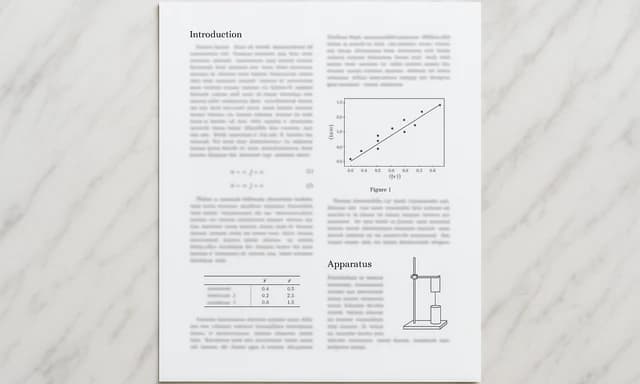
STEM lab report
Write up your experiment with methods, results, and references.

Academic CV
Format your publications, teaching, and experience as an academic CV.
05Free tools
Free AI tools researchers use before signing up
No account needed. Each tool does one job well and hands the result to the workspace when you want to keep going.
- Literature review generatorOrganize a research question, scope, themes, and supplied sources into a defensible literature review structure without pretending unsupplied research was read.Open the tool
- Abstract generatorAdd your introduction, methods, results, and conclusion to preview a publication-style abstract structure, then create the complete editable abstract in Huggle.Open the tool
- LaTeX table generatorBuild publication-ready LaTeX tables in your browser. Edit cells like a spreadsheet, paste from Excel or Markdown, and copy clean booktabs code. Free, no signup needed to generate.Open the tool
- BibTeX generatorPaste a URL, DOI, or a citation in any style and get a clean BibTeX entry with the right entry type and a readable cite key. Free, no signup needed to generate.Open the tool
- IEEE citation generatorPaste a URL, DOI, paper title, or BibTeX entry and get a correctly formatted IEEE reference, the in-text citation, and matching BibTeX. Free, no signup needed to generate.Open the tool
- Harvard referencing generatorPaste a URL, DOI, article title, or BibTeX entry and get a correctly formatted Harvard reference, the in-text citation, and matching BibTeX. Free, no signup needed to generate.Open the tool
- Chicago citation generatorPaste a URL, DOI, book or article title, or BibTeX entry and get the Chicago bibliography entry, footnote, and author-date forms in one pass. Free, no signup needed to generate.Open the tool
06FAQ
Questions researchers ask about Huggle
Short answers, in the page HTML and mirrored in the FAQ structured data.
01Can Huggle write a research paper in LaTeX?
Yes. Huggle drafts the manuscript in LaTeX with sections, equations, figures, booktabs tables, and a BibTeX bibliography, compiles it in the workspace, and keeps both the source and the rendered PDF editable. You supply the results and the claims; Huggle handles structure, prose, and formatting.
02Does Huggle invent citations?
Huggle formats the sources you provide and can search for sources when asked, but you should verify every reference against the original before submission. The BibTeX and citation tools produce correctly formatted entries from real metadata you paste in.
03Which citation styles does Huggle support?
APA, MLA, Chicago, Harvard, IEEE, AMA, ACS, CSE, Turabian, and ASA through the free citation tools, plus BibTeX for LaTeX. Inside the workspace you can ask for any of these styles in a document or paper.
04How is Huggle different from Claude or Manus for research?
Claude is a single-vendor assistant that returns conversations and downloadable files. Manus is an autonomous agent that returns deliverables from a run. Huggle includes every frontier model and keeps the paper, the results sheet, and the study database open as editable artifacts side by side.
05Can Huggle automate recurring research tasks?
Yes. Agents and scheduled automations can, for example, pull new results from a connected GitHub repository, update a results spreadsheet, and refresh a figure on a schedule, using connectors for GitHub, Linear, and Google Workspace.
Huggle for researchers
Describe the work once. Edit the file the moment it lands.
Start free with no card. Documents, decks, spreadsheets, LaTeX, databases, and websites, every frontier model included, from $10 a month when you upgrade.